The Where Clause
Primary key
When setting up the primary key like
CREATE TABLE employees (
   employee_id   NUMBER        NOT NULL,
   first_name    VARCHAR(1000) NOT NULL,
   last_name     VARCHAR(1000) NOT NULL,
   date_of_birth DATE          NOT NULL,
   phone_number  VARCHAR(1000) NOT NULL,
   CONSTRAINT employees_pk PRIMARY KEY (employee_id)
)
The database is already indexed the primary key for us without having to do create index.
There fore when executing WHERE employee_id = 123 it's directly doing:
INDEX_UNIQUE_SCANINDEX_ACCESS_BY_ROW
Therefore there is no slowness here
Combined index
Imagine there is a merge company and your index is simply not unique by employee_id anymore. As a result, you need to use both employee_id and a new field subsidiary_id to query
CREATE UNIQUE INDEX employees_pk
    ON employees (employee_id, subsidiary_id)
When we do something like this which provide the full primary key. The table will perform INDEX_UNIQUE_SCAN which is optimal
SELECT first_name, last_name
  FROM employees
 WHERE employee_id   = 123
   AND subsidiary_id = 30
However if we only search on subsidiary_id
SELECT first_name, last_name
  FROM employees
 WHERE subsidiary_id = 20
It will do a TABLE ACCESS FULL which is very slow
The reason is when creating the index with (first_key, second_key). The table store in sorted first_key. The second_key is only consider when the first_key is the same
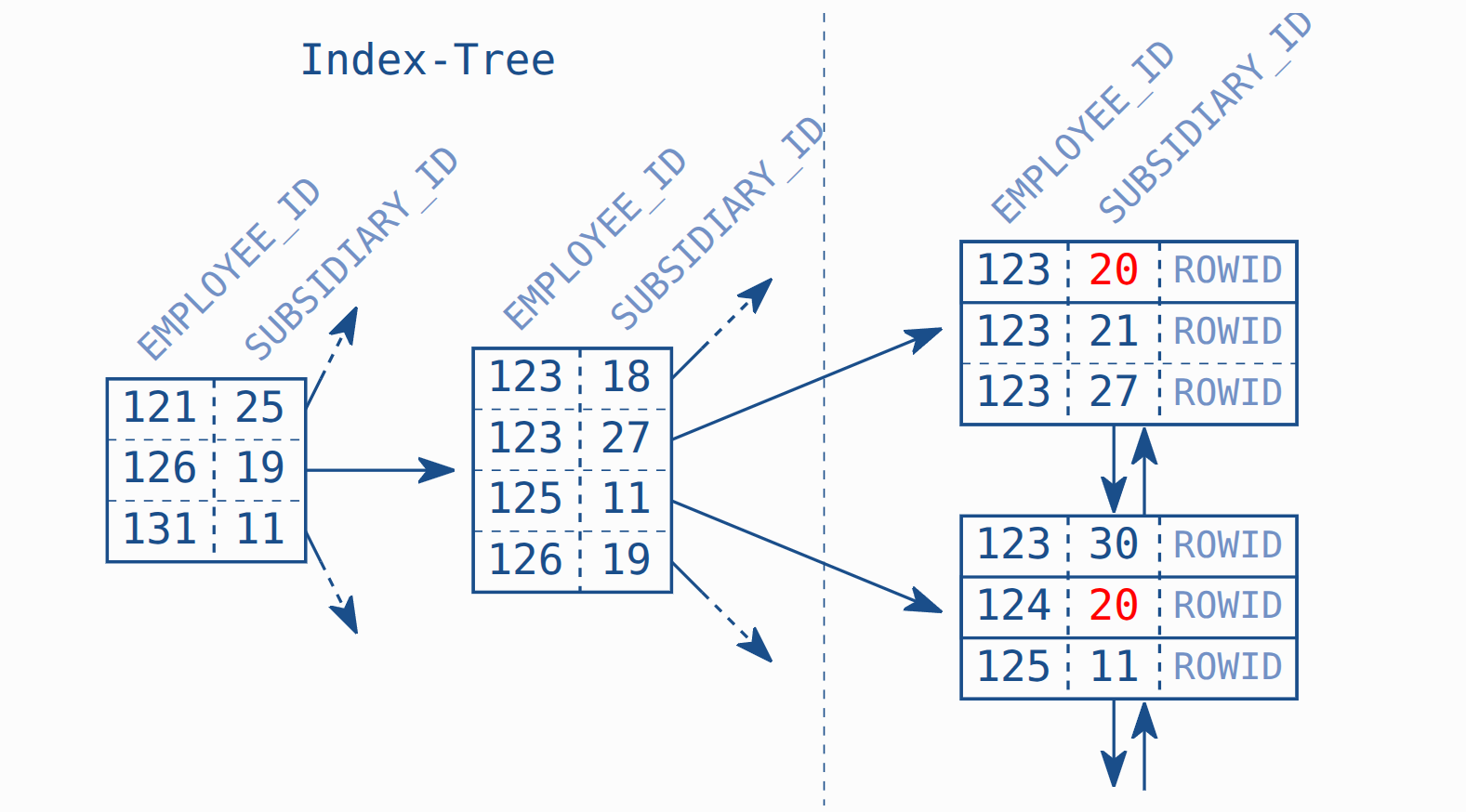
Solution
Create a reverse index or change the original index
CREATE UNIQUE INDEX EMPLOYEES_PK
    ON EMPLOYEES (SUBSIDIARY_ID, EMPLOYEE_ID)
So when searching providing subsidiary_id, it will scan for subsidiary_id in sorted order and find the key fast.
The operation will be using INDEX RANGE SCAN instead
Slow index
Assume that for the previous example, you switched the index to use
CREATE UNIQUE INDEX EMPLOYEES_PK
    ON EMPLOYEES (SUBSIDIARY_ID, EMPLOYEE_ID)
And then we do query like
SELECT first_name, last_name, subsidiary_id, phone_number
  FROM employees
 WHERE last_name  = 'WINAND'
   AND subsidiary_id = 30
We can see that this same result slower than before for some reasons
We then investigate the query
---------------------------------------------------------------
|Id |Operation                   | Name         | Rows | Cost |
---------------------------------------------------------------
| 0 |SELECT STATEMENT            |              |    1 |   30 |
|*1 | TABLE ACCESS BY INDEX ROWID| EMPLOYEES    |    1 |   30 |
|*2 |  INDEX RANGE SCAN          | EMPLOYEES_PK |   40 |    2 |
---------------------------------------------------------------

Predicate Information (identified by operation id):
---------------------------------------------------
  1 - filter("LAST_NAME"='WINAND')
  2 - access("SUBSIDIARY_ID"=30)
We can read 2 -> 1 -> 0. So it will do a index range scan first. And then table access by row id.
However this might be slower than full table scan.
Full table scan
In some scenarios, full table scan might be faster. Since it can read a huge trunk at once instead of multiple read. In this example. If we do a full table scan.
----------------------------------------------------
| Id | Operation         | Name      | Rows | Cost |
----------------------------------------------------
|  0 | SELECT STATEMENT  |           |    1 |  477 |
|* 1 |  TABLE ACCESS FULL| EMPLOYEES |    1 |  477 |
----------------------------------------------------

Predicate Information (identified by operation id):
---------------------------------------------------
   1 - filter("LAST_NAME"='WINAND' AND "SUBSIDIARY_ID"=30)
The cost is more but the number of row is 1. This is because for the INDEX_RANGE_SCAN, database need to
- Search all rows that has
SUBSIDIARY_ID = 30 - For each row, fetch the whole row using
ROWIDto compare if theLAST_NAMEmatches
However, using FULL_TABLE_SCAN, the database can read the whole chunk at once with less read operation
How would the database determine which operation is the best
This is often determine by the cost of the operation. DB will automatically choose the best cost. The cost is determine by statistics evaluation. Which are collected base on
- Number of distinct values
- Smallest and largest value
- Number of
nulloccurances and the column histogram
If there is no statistic available, it will default to some pre-defined number. In this case, this happen and it defaulted to 40 rows. Realisticly the correct statistics would be 1000 rows
---------------------------------------------------------------
|Id |Operation                   | Name         | Rows | Cost |
---------------------------------------------------------------
| 0 |SELECT STATEMENT            |              |    1 |  680 |
|*1 | TABLE ACCESS BY INDEX ROWID| EMPLOYEES    |    1 |  680 |
|*2 |  INDEX RANGE SCAN          | EMPLOYEES_PK | 1000 |    4 |
---------------------------------------------------------------

Predicate Information (identified by operation id):
---------------------------------------------------
  1 - filter("LAST_NAME"='WINAND')
  2 - access("SUBSIDIARY_ID"=30)
Hence explain the reason why using INDEX_RANGE_SCAN is slower comparing to a full-scan.
Create an index to improve performance
Of course we can create an index to improve the performance, for example:
CREATE INDEX emp_name ON employees (last_name)
--------------------------------------------------------------
| Id | Operation                   | Name      | Rows | Cost |
--------------------------------------------------------------
|  0 | SELECT STATEMENT            |           |    1 |    3 |
|* 1 |  TABLE ACCESS BY INDEX ROWID| EMPLOYEES |    1 |    3 |
|* 2 |   INDEX RANGE SCAN          | EMP_NAME  |    1 |    1 |
--------------------------------------------------------------

Predicate Information (identified by operation id):
---------------------------------------------------
   1 - filter("SUBSIDIARY_ID"=30)
   2 - access("LAST_NAME"='WINAND')