OSPF Router Setup
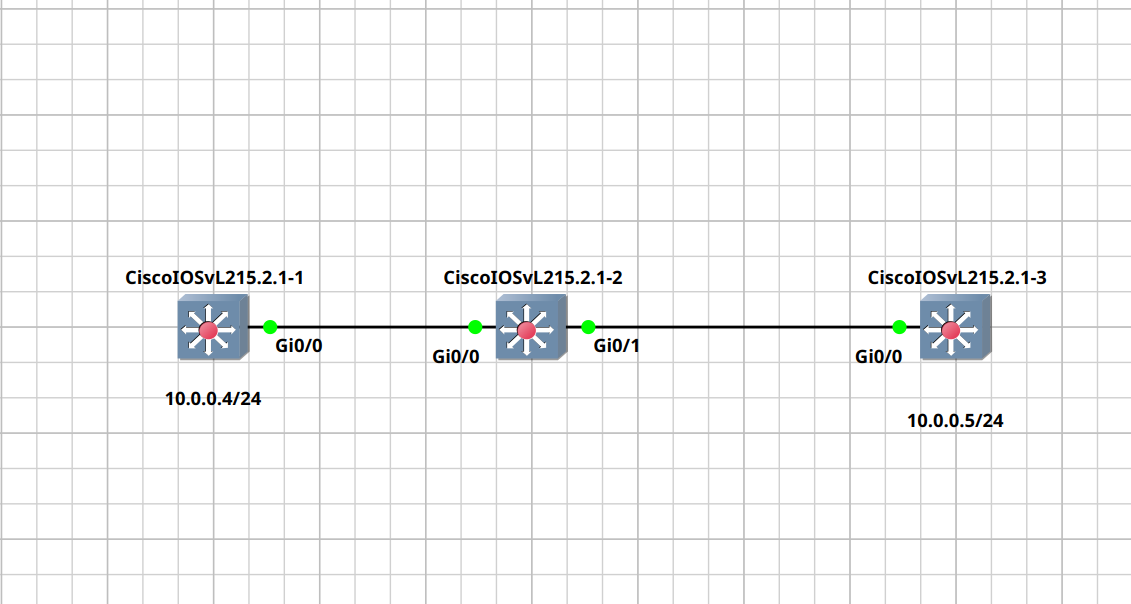
Let's annotate the following as A — B — C router
On router A
enconfig tint Gi0/0no switchport— to convert it to L3 interface (able to handle IP)ip address 10.0.0.4 255.255.255.0— assign 10.0.0.4/24
On router C
enconfig tint Gi0/0no switchport— to convert it to L3 interface (able to handle IP)ip address 10.0.0.5 255.255.255.0— assign 10.0.0.5/24
On router B
enconfig tint Gi0/0switchport mode access— change it to taking a vlan onlyswitchport access vlan 10int Gi0/1switchport mode access— change it to taking a vlan onlyswitchport access vlan 10
Confirmation
- On router B:
show vlan— make sure that Gi0/1 and Gi0/0 are in vlan 10
- On router A and C:
- Try to ping eachother
ping 10.0.0.5andping 10.0.0.4and make sure that they're ok
- Try to ping eachother
Next we will setup ospf
On router A
enconfig trouter ospf 1— chosing a random ospf ip (1)network 10.0.0.0 0.0.0.255 area 0— setting 10.0.0.0/24 to be included in ospfexit
On router B
enconfig trouter ospf 1— chosing a random ospf ip (1)network 10.0.0.0 0.0.0.255 area 0— setting 10.0.0.0/24 to be included in ospfexit
Now we should be able to see the ospf router when doingshow ip ospf neighbor` on router A and B
Switch#show ip ospf neighbor

Neighbor ID     Pri   State           Dead Time   Address         Interface
10.0.0.5          1   FULL/DR         00:00:37    10.0.0.5        GigabitEthernet0/0