Linux Bridge
Suppose we have this setup here with
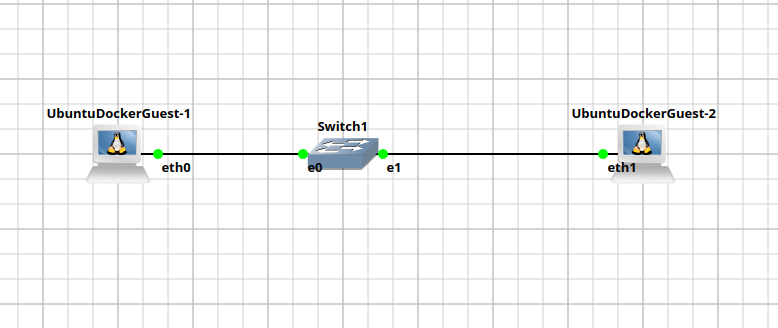
By default each physical interface will be assigned a bridge in the PC. So if i do
root@UbuntuDockerGuest-2:~# ifconfig
eth0: flags=4163<UP,BROADCAST,RUNNING,MULTICAST>  mtu 1500
        inet6 fe80::42:a1ff:fe7e:8800  prefixlen 64  scopeid 0x20<link>
        ether 02:42:a1:7e:88:00  txqueuelen 1000  (Ethernet)
        RX packets 0  bytes 0 (0.0 B)
        RX errors 0  dropped 0  overruns 0  frame 0
        TX packets 0  bytes 0 (0.0 B)
        TX errors 0  dropped 0 overruns 0  carrier 0  collisions 0

eth1: flags=4163<UP,BROADCAST,RUNNING,MULTICAST>  mtu 1500
        inet6 fe80::42:a1ff:fe7e:8801  prefixlen 64  scopeid 0x20<link>
        ether 02:42:a1:7e:88:01  txqueuelen 1000  (Ethernet)
        RX packets 7  bytes 566 (566.0 B)
        RX errors 0  dropped 1  overruns 0  frame 0
        TX packets 8  bytes 656 (656.0 B)
        TX errors 0  dropped 0 overruns 0  carrier 0  collisions 0

lo: flags=73<UP,LOOPBACK,RUNNING>  mtu 65536
        inet 127.0.0.1  netmask 255.0.0.0
        inet6 ::1  prefixlen 128  scopeid 0x10<host>
        loop  txqueuelen 1000  (Local Loopback)
        RX packets 0  bytes 0 (0.0 B)
        RX errors 0  dropped 0  overruns 0  frame 0
        TX packets 0  bytes 0 (0.0 B)
        TX errors 0  dropped 0 overruns 0  carrier 0  collisions 0
It should show 2 physical bridges.
Now we can create a new bridges using
ip link add name br0 type bridge
ip link set br0 up
root@UbuntuDockerGuest-2:~# ifconfig
br0: flags=4163<UP,BROADCAST,RUNNING,MULTICAST>  mtu 1500
        inet6 fe80::94f4:ddff:fe02:ea23  prefixlen 64  scopeid 0x20<link>
        ether 96:f4:dd:02:ea:23  txqueuelen 1000  (Ethernet)
        RX packets 0  bytes 0 (0.0 B)
        RX errors 0  dropped 0  overruns 0  frame 0
        TX packets 8  bytes 704 (704.0 B)
        TX errors 0  dropped 0 overruns 0  carrier 0  collisions 0

eth0: flags=4163<UP,BROADCAST,RUNNING,MULTICAST>  mtu 1500
        inet6 fe80::42:a1ff:fe7e:8800  prefixlen 64  scopeid 0x20<link>
        ether 02:42:a1:7e:88:00  txqueuelen 1000  (Ethernet)
        RX packets 0  bytes 0 (0.0 B)
        RX errors 0  dropped 0  overruns 0  frame 0
        TX packets 0  bytes 0 (0.0 B)
        TX errors 0  dropped 0 overruns 0  carrier 0  collisions 0

eth1: flags=4163<UP,BROADCAST,RUNNING,MULTICAST>  mtu 1500
        inet6 fe80::42:a1ff:fe7e:8801  prefixlen 64  scopeid 0x20<link>
        ether 02:42:a1:7e:88:01  txqueuelen 1000  (Ethernet)
        RX packets 10  bytes 776 (776.0 B)
        RX errors 0  dropped 1  overruns 0  frame 0
        TX packets 11  bytes 866 (866.0 B)
        TX errors 0  dropped 0 overruns 0  carrier 0  collisions 0

lo: flags=73<UP,LOOPBACK,RUNNING>  mtu 65536
        inet 127.0.0.1  netmask 255.0.0.0
        inet6 ::1  prefixlen 128  scopeid 0x10<host>
        loop  txqueuelen 1000  (Local Loopback)
        RX packets 0  bytes 0 (0.0 B)
        RX errors 0  dropped 0  overruns 0  frame 0
        TX packets 0  bytes 0 (0.0 B)
        TX errors 0  dropped 0 overruns 0  carrier 0  collisions 0
From this bridge here, we can assign some ip to it
ip addr add 10.0.0.2/24 dev br0
root@UbuntuDockerGuest-2:~# ifconfig
br0: flags=4163<UP,BROADCAST,RUNNING,MULTICAST>  mtu 1500
        inet 10.0.0.2  netmask 255.255.255.0  broadcast 0.0.0.0
        inet6 fe80::94f4:ddff:fe02:ea23  prefixlen 64  scopeid 0x20<link>
        ether 96:f4:dd:02:ea:23  txqueuelen 1000  (Ethernet)
        RX packets 0  bytes 0 (0.0 B)
        RX errors 0  dropped 0  overruns 0  frame 0
        TX packets 13  bytes 1054 (1.0 KB)
        TX errors 0  dropped 0 overruns 0  carrier 0  collisions 0

eth0: flags=4163<UP,BROADCAST,RUNNING,MULTICAST>  mtu 1500
        inet6 fe80::42:a1ff:fe7e:8800  prefixlen 64  scopeid 0x20<link>
        ether 02:42:a1:7e:88:00  txqueuelen 1000  (Ethernet)
        RX packets 0  bytes 0 (0.0 B)
        RX errors 0  dropped 0  overruns 0  frame 0
        TX packets 0  bytes 0 (0.0 B)
        TX errors 0  dropped 0 overruns 0  carrier 0  collisions 0

eth1: flags=4163<UP,BROADCAST,RUNNING,MULTICAST>  mtu 1500
        inet6 fe80::42:a1ff:fe7e:8801  prefixlen 64  scopeid 0x20<link>
        ether 02:42:a1:7e:88:01  txqueuelen 1000  (Ethernet)
        RX packets 11  bytes 846 (846.0 B)
        RX errors 0  dropped 1  overruns 0  frame 0
        TX packets 12  bytes 936 (936.0 B)
        TX errors 0  dropped 0 overruns 0  carrier 0  collisions 0

lo: flags=73<UP,LOOPBACK,RUNNING>  mtu 65536
        inet 127.0.0.1  netmask 255.0.0.0
        inet6 ::1  prefixlen 128  scopeid 0x10<host>
        loop  txqueuelen 1000  (Local Loopback)
        RX packets 0  bytes 0 (0.0 B)
        RX errors 0  dropped 0  overruns 0  frame 0
        TX packets 0  bytes 0 (0.0 B)
        TX errors 0  dropped 0 overruns 0  carrier 0  collisions 0
I'll do the same thing for UbuntuDockerGuest-1
root@UbuntuDockerGuest-1:~# ifconfig
br0: flags=4163<UP,BROADCAST,RUNNING,MULTICAST>  mtu 1500
        inet 10.0.0.3  netmask 255.255.255.0  broadcast 0.0.0.0
        inet6 fe80::649a:7bff:fe5b:dc7c  prefixlen 64  scopeid 0x20<link>
        ether 66:9a:7b:5b:dc:7c  txqueuelen 1000  (Ethernet)
        RX packets 0  bytes 0 (0.0 B)
        RX errors 0  dropped 0  overruns 0  frame 0
        TX packets 10  bytes 844 (844.0 B)
        TX errors 0  dropped 0 overruns 0  carrier 0  collisions 0

eth0: flags=4163<UP,BROADCAST,RUNNING,MULTICAST>  mtu 1500
        inet6 fe80::42:68ff:fecb:ac00  prefixlen 64  scopeid 0x20<link>
        ether 02:42:68:cb:ac:00  txqueuelen 1000  (Ethernet)
        RX packets 12  bytes 936 (936.0 B)
        RX errors 0  dropped 0  overruns 0  frame 0
        TX packets 13  bytes 1006 (1.0 KB)
        TX errors 0  dropped 0 overruns 0  carrier 0  collisions 0

eth1: flags=4163<UP,BROADCAST,RUNNING,MULTICAST>  mtu 1500
        inet6 fe80::42:68ff:fecb:ac01  prefixlen 64  scopeid 0x20<link>
        ether 02:42:68:cb:ac:01  txqueuelen 1000  (Ethernet)
        RX packets 0  bytes 0 (0.0 B)
        RX errors 0  dropped 0  overruns 0  frame 0
        TX packets 0  bytes 0 (0.0 B)
        TX errors 0  dropped 0 overruns 0  carrier 0  collisions 0

lo: flags=73<UP,LOOPBACK,RUNNING>  mtu 65536
        inet 127.0.0.1  netmask 255.0.0.0
        inet6 ::1  prefixlen 128  scopeid 0x10<host>
        loop  txqueuelen 1000  (Local Loopback)
        RX packets 0  bytes 0 (0.0 B)
        RX errors 0  dropped 0  overruns 0  frame 0
        TX packets 0  bytes 0 (0.0 B)
        TX errors 0  dropped 0 overruns 0  carrier 0  collisions 0
However, if we do a ping from PC1 to PC2 it will go dead-end. Since this br0 does not map to any physical interface
root@UbuntuDockerGuest-1:~# ping 10.0.0.2
PING 10.0.0.2 (10.0.0.2) 56(84) bytes of data.
^C
--- 10.0.0.2 ping statistics ---
2 packets transmitted, 0 received, 100% packet loss, time 1043ms
We now need to bind br0 to a physical interface
root@UbuntuDockerGuest-1:~# ip link set eth0 master br0
root@UbuntuDockerGuest-2:~# ip link set eth1 master br0
This is because currently, Guest-1 is connecting using eth0 and Guest-2 is connecting using eth1. We confirm again:
root@UbuntuDockerGuest-1:~# ip link show master br0
21: eth0: <BROADCAST,MULTICAST,UP,LOWER_UP> mtu 1500 qdisc fq_codel master br0 state UNKNOWN mode DEFAULT group default qlen 1000
    link/ether 02:42:68:cb:ac:00 brd ff:ff:ff:ff:ff:ff
Now our ping would work
root@UbuntuDockerGuest-1:~# ping 10.0.0.2
PING 10.0.0.2 (10.0.0.2) 56(84) bytes of data.
64 bytes from 10.0.0.2: icmp_seq=1 ttl=64 time=0.626 ms
64 bytes from 10.0.0.2: icmp_seq=2 ttl=64 time=0.456 ms
root@UbuntuDockerGuest-2:~# ping 10.0.0.3
PING 10.0.0.3 (10.0.0.3) 56(84) bytes of data.
64 bytes from 10.0.0.3: icmp_seq=1 ttl=64 time=0.299 ms
64 bytes from 10.0.0.3: icmp_seq=2 ttl=64 time=0.521 ms
^C
--- 10.0.0.3 ping statistics ---
2 packets transmitted, 2 received, 0% packet loss, time 1050ms
rtt min/avg/max/mdev = 0.299/0.410/0.521/0.111 ms