Virtual Thread
Virtual thread was added in Project Loom which meant to extends the support for concurrency in Java 19.
Definition
Virtual thread is a thread that controlled by the JVM instead of the OS. JVM uses the OS thread as the carrier for the virtual thread (we explore more on this later).
Therefore, 1 OS thread can run multiple virtual thread synchronously. However if there is multiple OS thread, we can run multiple virtual thread concurrently
How it works
Virtual thread memory is stored in a Stack instead of a Heap whereas the OS thread memory is stored in the heap.
Each virtual thread will be executed from 1 OS thread. As a result, we call this OS thread as the carrier of the virtual thread.
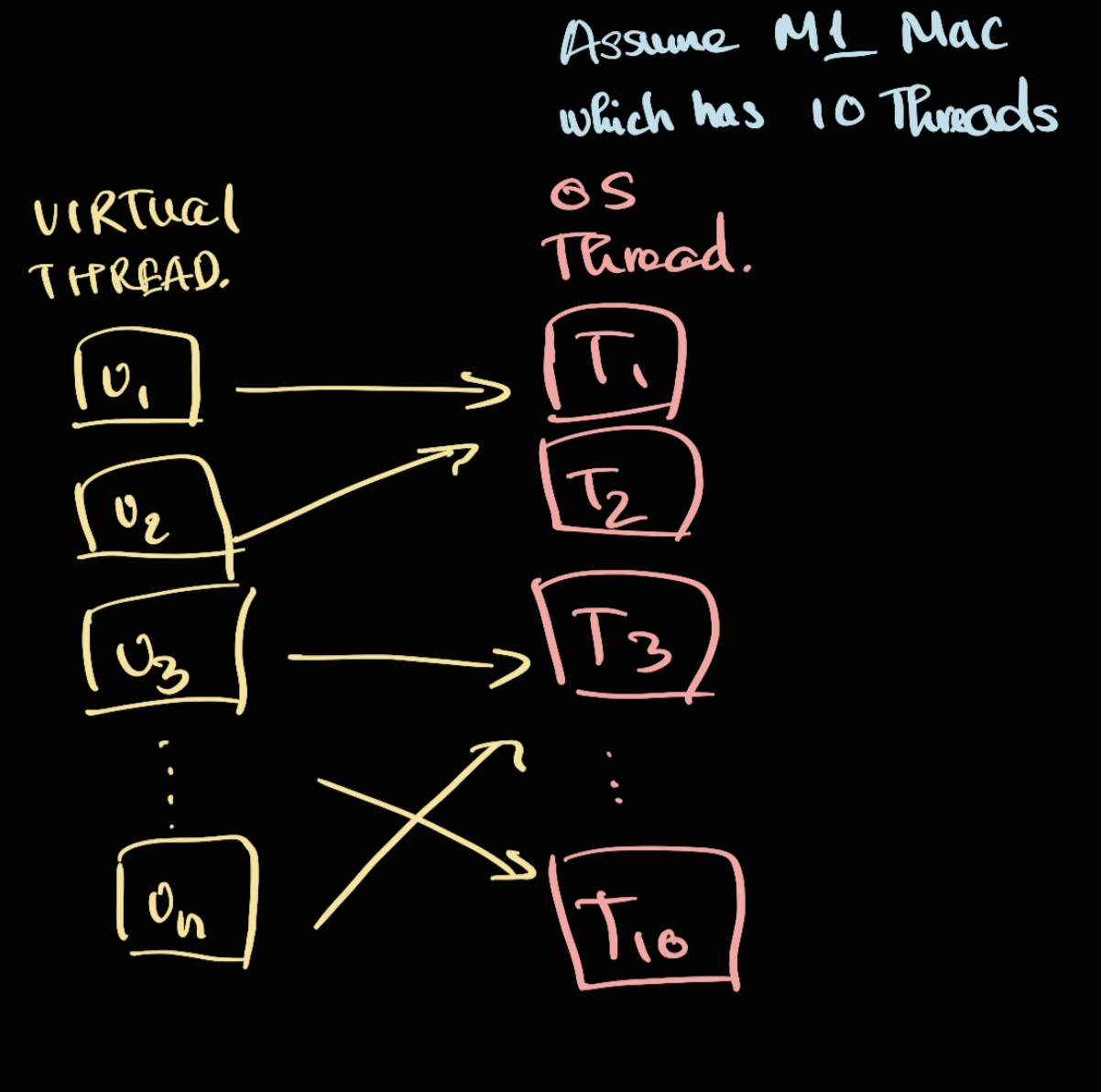
In this case, T1 (thread 1) could be handling V1 (Virtual thread 1) and V2.
To find the number of threads in MacOS, we can do
sysctl hw.physicalcpu hw.logicalcpu
And look at hw.logicalcpu
Thread pinning
By default, the virtual thread is not pinned to OS thread. So T1 could be handling V1 and V2 but later on could be handling some Vn.
However, if we're running synchronized block the virtual thread will be pinned to an OS thread .
Memory
Each virtual thread has its own memory in a heap. When an OS Thread take it, it will transfer the heap memory to OS Thread stack memory and execute there.
Blocking operation
When a virtual thread is being blocked (by using Sleep for example), the OS thread will execute other eligble virtual thread. When the virutal thread finished the blocking operation, the Processor Thread Scheduler will schedule it again for execution (could go to the same OS thread or different OS thread).
Read more: The Ultimate Guide to Java Virtual Threads - Rock the JVM Blog
[!danger]
Since virtual thread is a daemon thread. A JVM will exit if there is no daemon thread running. Therefore, if you're doing something like@Scheduled, the JVM will shutdown and led to unexpected behaviour.If using springboot, this can be fixed by using
spring.main.keep-alive=true
Example
package org.example.chapter5;

import java.util.concurrent.ExecutionException;
import java.util.concurrent.FutureTask;
import java.util.concurrent.ThreadFactory;

public class VirtualThreadTest {
    public static void main(String[] args) throws ExecutionException, InterruptedException {
        FutureTask<Void> runnable = new FutureTask<Void>(() -> {
            while (true) {

            }
        });

        ThreadFactory threadFactory = Thread.ofVirtual().factory();
        var thread = threadFactory.newThread(runnable);
        System.out.println(ProcessHandle.current().pid());
        thread.start();
        System.out.println(runnable.get());
    }
}
This would give us the current pid. In which we can use the command
jcmd pid Thread.print
For example we have
"ForkJoinPool-1-worker-1" #36 [241729] daemon prio=5 os_prio=0 cpu=10149.22ms elapsed=10.15s tid=0x00007c9f6c17eb40  [0x00007c9f3c72d000]
   Carrying virtual thread #35
        at jdk.internal.vm.Continuation.run([email protected]/Continuation.java:251)
        at java.lang.VirtualThread.runContinuation([email protected]/VirtualThread.java:303)
        at java.lang.VirtualThread$$Lambda/0x00007c9eef0466c0.run([email protected]/Unknown Source)
        at java.util.concurrent.ForkJoinTask$RunnableExecuteAction.compute([email protected]/ForkJoinTask.java:1735)
        at java.util.concurrent.ForkJoinTask$RunnableExecuteAction.compute([email protected]/ForkJoinTask.java:1726)
        at java.util.concurrent.ForkJoinTask$InterruptibleTask.exec([email protected]/ForkJoinTask.java:1650)
        at java.util.concurrent.ForkJoinTask.doExec([email protected]/ForkJoinTask.java:507)
        at java.util.concurrent.ForkJoinPool$WorkQueue.topLevelExec([email protected]/ForkJoinPool.java:1394)
        at java.util.concurrent.ForkJoinPool.runWorker([email protected]/ForkJoinPool.java:1970)
        at java.util.concurrent.ForkJoinWorkerThread.run([email protected]/ForkJoinWorkerThread.java:187)
   Mounted virtual thread #35
        at org.example.chapter5.VirtualThreadTest.lambda$main$0(VirtualThreadTest.java:10)
        at org.example.chapter5.VirtualThreadTest$$Lambda/0x00007c9eef000a18.call(Unknown Source)
        at java.util.concurrent.FutureTask.run([email protected]/FutureTask.java:328)
        at java.lang.Thread.runWith([email protected]/Thread.java:1460)
        at java.lang.VirtualThread.run([email protected]/VirtualThread.java:466)
        at java.lang.VirtualThread$VThreadContinuation$1.run([email protected]/VirtualThread.java:258)
        at jdk.internal.vm.Continuation.enter0([email protected]/Continuation.java:325)
        at jdk.internal.vm.Continuation.enter([email protected]/Continuation.java:316)
This means the virtual thread is mounted on 241729, which we can chekc with htop or ps
ps aux -L | grep 241729
Note: use -L here to detects thread
When to use virtual thread vs when to use OS thread
Virtual thread is good for io-bounded task. OS Thread is good for cpu-bounded task