SSTable
A file format contains sorted string table which is a sorted list of <key, value> pairs. Used in LSM Tree (Log Structured Merge Tree).
SSTable performs append writes. Data is appending on top of each other and separated via different segments. When saving into a disk, we save the whole segments. This is much faster to traditional databases like B Tree and B+ Tree which uses a lot of random IO.
[!important]
Technically, in the condition where if the disk is full or there are 2 files writing at the same time, we need to do disk seeks. The first one where the disk is full, we need to find the available data block to store the file, whereas the second one, we need to jump back and forth to write the 2 files at two different location.But in an ideal condition where this is not happening, data is sequentials.
Implementing an SSTable
Implementing a basic key/value database
A basic key/value database can be implemented as follows:
#!/bin/bash
db_set () { echo "$1,$2" >> database }
db_get () { grep "^$1," database | sed -e "s/^$1,//" | tail -n 1 }
We can then call like this
db_set 123456 '{"name":"London","attractions":["Big Ben","London Eye"]}'
db_set 42 '{"name":"San Francisco","attractions":["Golden Gate Bridge"]}'
db_get 42
> {"name":"San Francisco","attractions":["Golden Gate Bridge"]}
db_set 42 '{"name":"San Francisco","attractions":["Exploratorium"]}'
db_get 42
> {"name":"San Francisco","attractions":["Exploratorium"]}
cat database
> 123456,{"name":"London","attractions":["Big Ben","London Eye"]}\n
  42,{"name":"San Francisco","attractions":["Golden Gate Bridge"]}\n
  42,{"name":"San Francisco","attractions":["Exploratorium"]}\n
This is a append-only data file. This is very fast for writing, however will be challenging for reading. Everytime we lookup a key, we need to scan through the whole file which takes $O(n)$.
If we need to scale read, we need some sort of index. However, adding an index would affect our write performance because nothing would beat just writing to the end of the file. However this is the trade-off we have to make, $O(n)$ read is not acceptable.
Improve 1: Hash index for read improve
We can keep the dictionary of our keys and where it's first appeared. We can do something like this
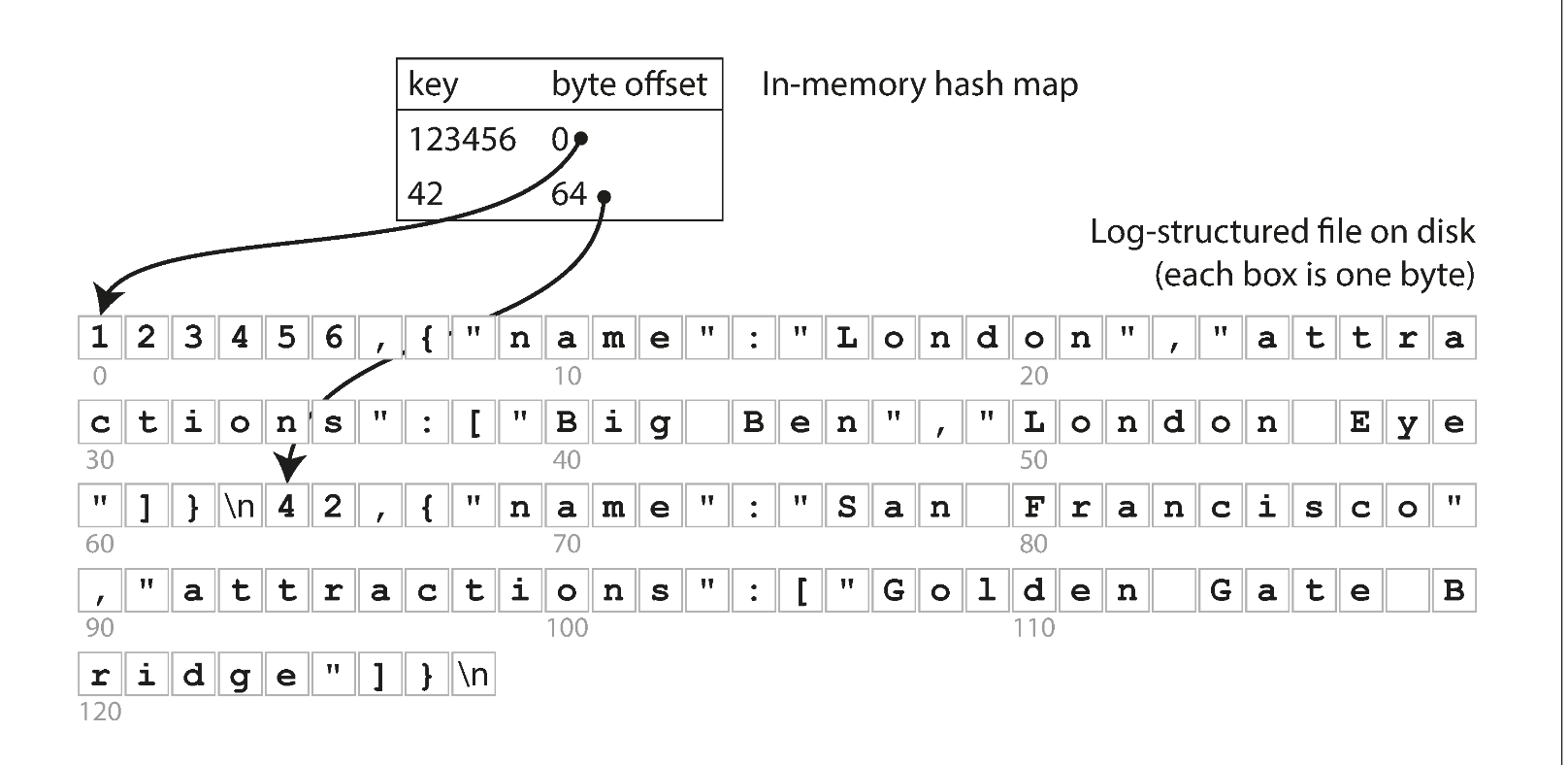
If we keep an index, for example:
index_table = {
    123456: 0
    42: 64
}
[!NOTE]
This is NOT memtable
This is just simply the character count in the file. We can just jump within the file and don't have to read from start, quite nice.
For write, we need to also update this hash index as we append new item into our database. This is a good trade off to improve read from $O(n) \rightarrow O(logN)$
Improve 2: Space improvement
If we keep adding to our file, the file would becomes very big and hard to manage. We would have a lot of duplicated key. To do this, we need a process called Compacting.
To do compacting, these is what we need to do:
- Write to smaller segments
- Merge these segments into compact segments (reduce the number of segments)
For example:
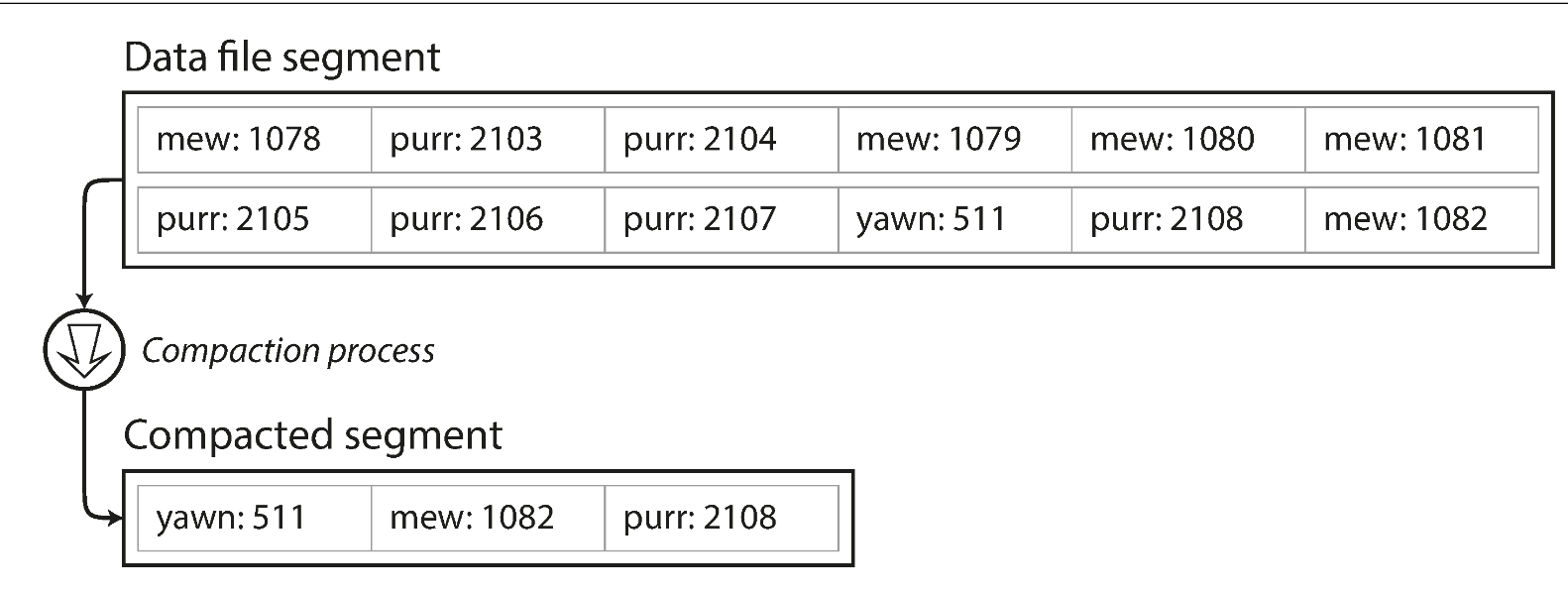
Figure 3-2. Compaction of a key-value update log (counting the number of times each cat video was played), retaining only the most recent value for each key.
[!important]
The count above is the number of time the cat video was played, not the indexing as referring to Improve 1 Hash index for read improve
We can also merge multiple segments at the same time for efficiency:
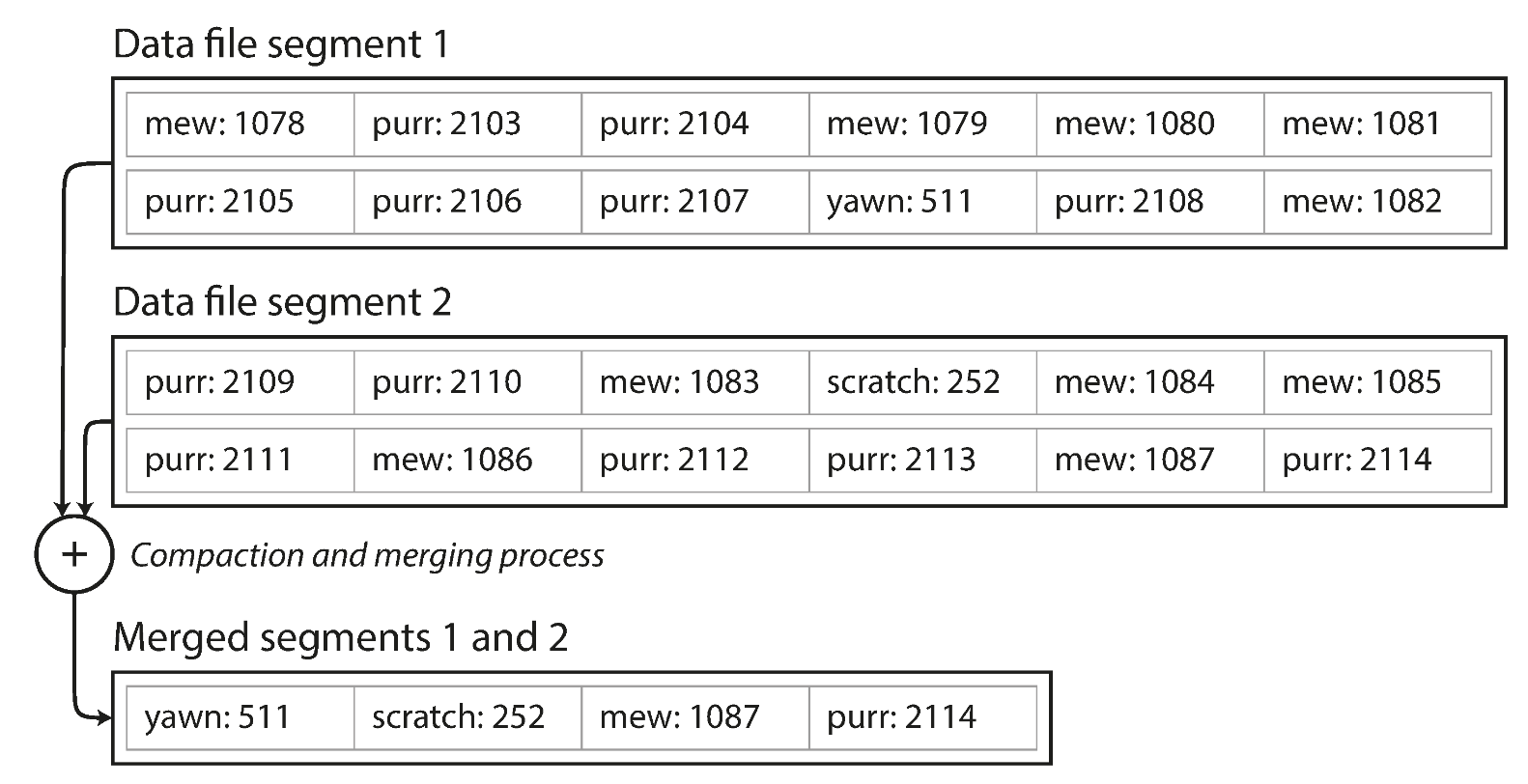
Figure 3-3. Performing compaction and segment merging simultaneously.
The merge simply hornor the most recent keys in these segements.
After merging these segments, we can simply delete the old one as they dont need anymore.
This also introduce some changes we need to do for our memory indexing Improve 1 Hash index for read improve, the new index could be looking like this:
index_table = [
    {
        "file": "seg1.db",
        "index": {
            "keyA": 0,
            "KeyB": 33
        }
    },
    {
        "file": "seg2.db",
        "index": {
            "keyA": 9,
            "keyC": 85
        }
    }
]
Now how do we know which segment would have our keys? We can simply search backward in our index_table. For example if we look for keyB, we search on seg2.db first and then seg1.db.
Improve 3: Other improvements
There are some improvements we can make
- File format
- We can store in something else that's not CSV. We can do
<length_of_string_in_byte><string>
- We can store in something else that's not CSV. We can do
- Deleting records
- If we want to delete the key, since the structure is immutable (append only). We can mark one as tombstone to mark it during the Compacting process
- Crash recovery
- Can restore each segment's hash map by reading entire segment file from beginning to end
- With Compacting happening here and there, the amount of segment files should be less
Since the file system is append only, it would be easier on the disk. We are just appending, the load on disk would be easier since the OS would just append the data at the end of the disk cursor. This is much faster than using something like B Tree and B+ Tree which would use random I/O since the data is places randomly in disk.
Upgrading to SSTables and LSM Trees
The only add-on that SSTables have comparing to our basic key/value table is the key is sorted per segment.
SSTable = Sorted Segment
LSM Tree (Log Structured Merge Tree) = whole system
How is it benefit us?
Benefit 1: Merging benefits
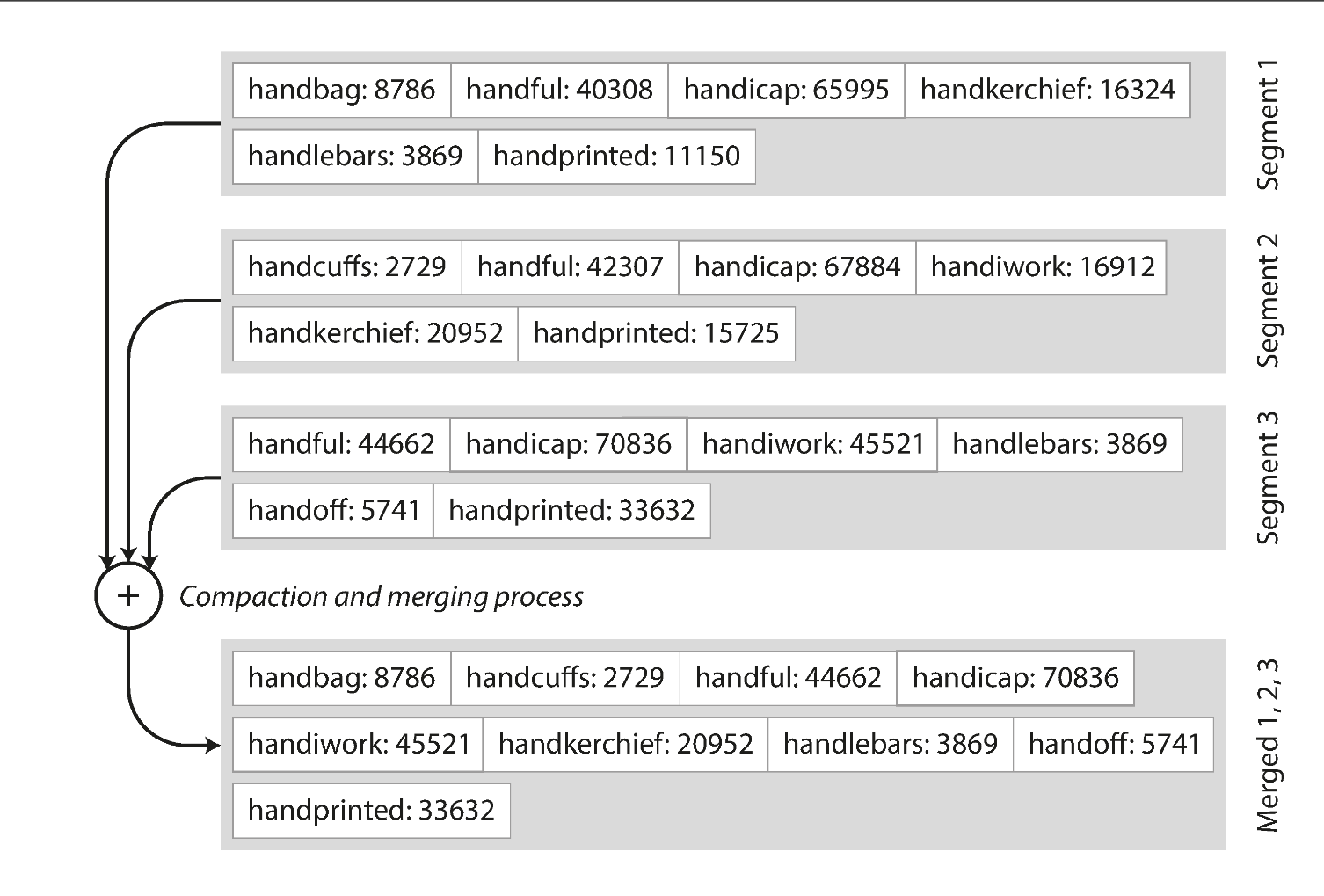
Merging is similar to Merge K sorted linked list, where we can just take the first key of each sorted segment and merge one by one. When multiple segments contain the same key, we can keep the value from the most recent segment and discard the values in older segments.
Benefit 2: Look up benefit
From Improve 2 Space improvement we can see that we need to keep track of every single key within each segments. However now if the segment is sorted, we simply don't need to keep track of all the keys.
For example
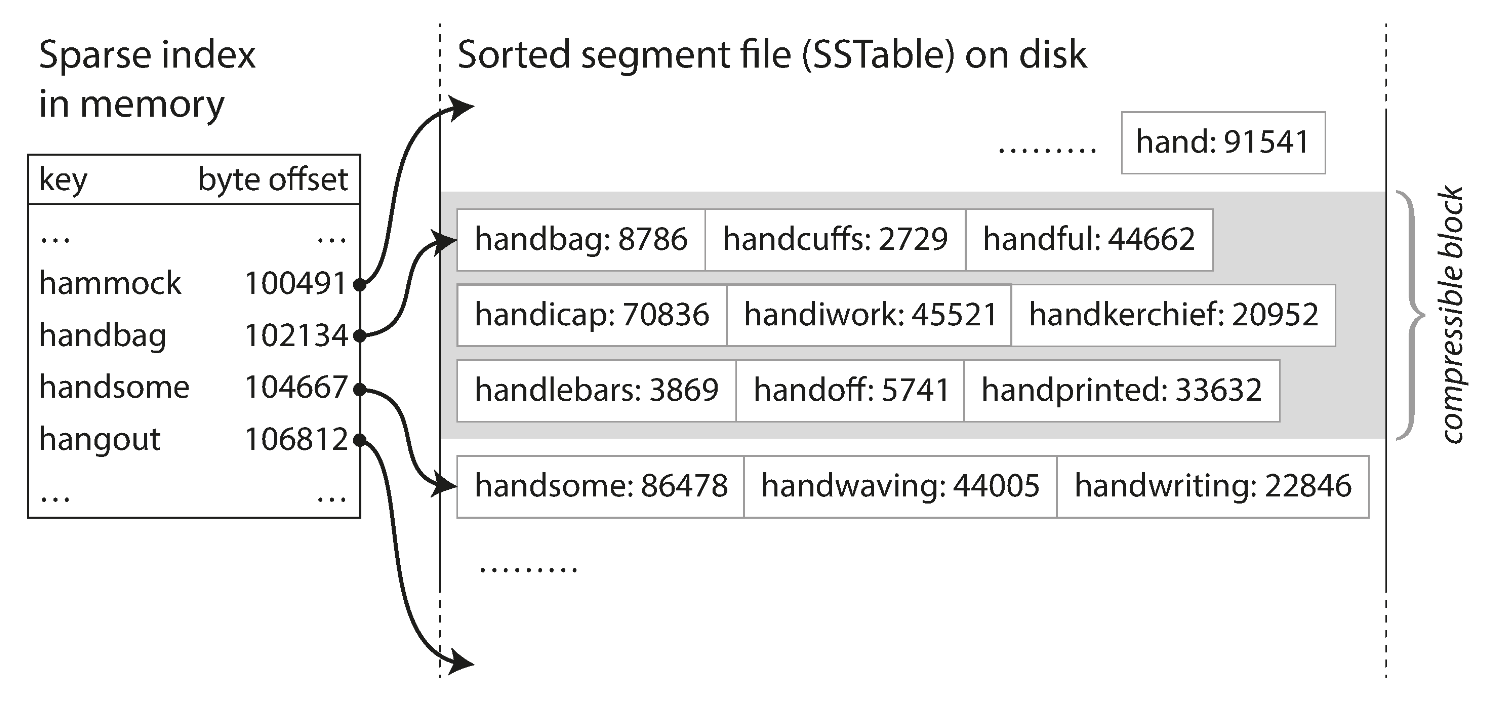
Our index table doesnt have the handiwork, but we know that it's gonna somewhere between handbag and handsome. As a result, we can go to these segments and start reading. Since the segment itself is sorted, we can use Binary Search to quickly find the key.
Sure it will be $O(1) \rightarrow O(logN)$ which looks like a downgrade impact but space gets improved from $O(N) \rightarrow O(logN)$ which is a nice optimisation.
To save bandwidth on I/O and space on the disk, we can also:
- compress the segment when store
- decompress when reading it.
Given a size of a segment is small (2MB), this be fast for us to compress with modern CPU. Compressing and decompressing 2MB with modern CPU is often much faster than reading 2MB.
How to get the data sorted in each segment
To maintain the data sorted, we need to use some sorted tree while writing, for example Red Black Tree. First we can write data into these tree (sometimes we call them memtable) And then we dump them into SSTable on disk, this will automatically make sure that our data is sorted.
Write sequence:
flowchart LR
    A(["Data"]) --> B["Red black tree<br>(memtable)"]
    B --> D["SSTable"]

    B@{ shape: das}
    D@{ shape: cyl}
Read sequence
---
config:
  theme: redux
---
flowchart LR
    A(["Read"]) --> B["Red black tree<br>(memtable)"]
    B --> n1["Is data in memtable?"]
    n1 -- Yes --> n2["Return data"]
    n1 -- No --> n3["Is data in segment[-1]?"]
    n3 -- Yes --> n4["Return data"]
    n3 -- No --> n5["Is data in segment[-2]"]
    n5 --> n6["..."]

    B@{ shape: das}
    n1@{ shape: diam}
    n3@{ shape: disk}
    n5@{ shape: disk}
    n6@{ shape: text}
What if data crashes when memtable has not flushed to sstable?
We then use WAL (Write A-head Logging) to keep track of the write transaction log. It's not sorted and doesn't matter if it's not sorted. The only thing we need from it is to recover data.
What if the key never been there, we can't just keep look up through each segment table?
In this case, we need to use Bloom Filter to determine if the key in there or not.
Considerations
We can consider our Compacting strategy to see how often we should compact our table. Normally common options are per size and per level.