Understand Binary, Hex And Octal
Understanding in code
In C or C++, we can represent hex and binary as:
- hex:
0x<HexValue> - binary:
0b<Binary> - octal:
0<Octet>(base 8)
| Term | Size | Representation |
|---|---|---|
| Bit | 1 bit | 0b1 |
| Nibble | 4 bits | 1 Hex Digit (0xF) |
| Octet (or Byte) | 8 bits | 2 Hex Digits (0xFF) |
For example, 0x10 this is a hex of 0000 0010 so the value would be $1 \times 16^{1}+ 0\times 16^{0} = 16$
Note: 0x10 is the same writing for 0x00000010 which is the same thing.
#include <cstypes.h>
#include <iostream>

int main() {
    int a = 0x10;
    int b = 0x00000010;
    std::cout << "a is: " << a << std::endl;
    std::cout << "b is: " << b << std::endl;
    return 0;
}
❯ make
a is: 16
b is: 16
Which ever leading 0 compiler will simple strip it.
Similarly in binary, we have the same concept: 0b10 will be $1 \times 2^{1}+ 0 \times 2^{0} = 2$
#include <cstypes.h>
#include <iostream>

int main() {
    int a = 0b10;
    int b = 0b0000000000000000000000000000000000000000010;
    std::cout << "a is: " << a << std::endl;
    std::cout << "b is: " << b << std::endl;
    return 0;
}
❯ make
a is: 2
b is: 2
For octet, the leading is 0, so if 010 will be $1 \times 8^{1}+ 0 \times 8^{0} = 8$
#include <cstypes.h>
#include <iostream>

int main() {
    int a = 010;
    int b = 00000000000000000000000000000000000000000010;
    std::cout << "a is: " << a << std::endl;
    std::cout << "b is: " << b << std::endl;
    return 0;
}
❯ make
a is: 8
b is: 8
Normally integer is a base 10 so it makes sense.
Value for each type
- Binary:
[0, 1] - Hex:
[0,1,2,3,4,5,6,7,8,9,A,B,C,D,E,F]A -> Frepresent 10 → 15
- Octal:
[0,1,2,3,4,5,6,7]
Using with cstdint
cstdint allow us to have a fine gain of the memory, where the smallest unit is 1 byte = 8 bit. For example
#include <cstdint>
#include <iostream>

int main() {
    uint8_t a = 0x1;
    std::cout << sizeof(a) << std::endl;
    return 0;
}
❯ make
1
This will be exactly 1 bit, since we're using uint8_t which means we have 8 bits (1 byte) representation: 0000 0001. This is the same thing as
#include <cstdint>
#include <iostream>

int main() {
    uint8_t a = 0b00000001;
    std::cout << sizeof(a) << std::endl;
    return 0;
}
But the moment we exceed 1 byte, it' gonna complain
#include <cstdint>
#include <iostream>

int main() {
    uint8_t a = 0b100000001; // 9 bits
    std::cout << sizeof(a) << std::endl;
    return 0;
}
❯ make
main.cpp: In function ‘int main()’:
main.cpp:5:17: warning: unsigned conversion from ‘int’ to ‘uint8_t’ {aka ‘unsigned char’} changes value from ‘257’ to ‘1’ [-Woverflow]
    5 |     uint8_t a = 0b100000001;
      |                 ^~~~~~~~~~~
1
Similarly, for hex:
#include <cstdint>
#include <iostream>

int main() {
    uint8_t a = 0x123; // Exceed 8 bit
    std::cout << sizeof(a) << std::endl;
    return 0;
}
❯ make
main.cpp: In function ‘int main()’:
main.cpp:5:17: warning: unsigned conversion from ‘int’ to ‘uint8_t’ {aka ‘unsigned char’} changes value from ‘291’ to ‘35’ [-Woverflow]
    5 |     uint8_t a = 0x123;
      |                 ^~~~~
1
If we use uint16_t, it will show as 2 bytes (16 bits)
#include <cstdint>
#include <iostream>

int main() {
    uint16_t a = 0x123;
    std::cout << sizeof(a) << std::endl;
    return 0;
}
Understanding Hex Editor
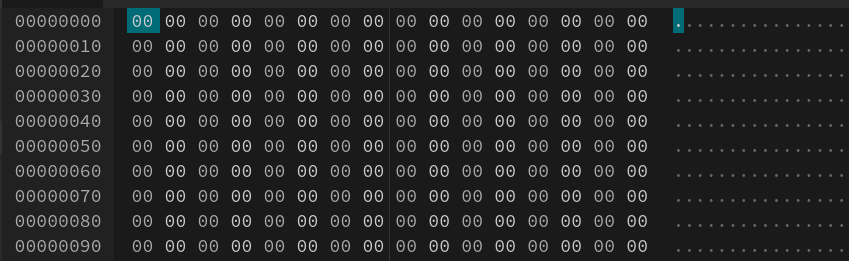
In the middle row, a hex value is a combination of 2 number 0x??. Why 2 number? because it sum up to 1 byte (8 bit) since 1 hex number = 4 byte (1 nibble). The right handside is the display, it's pretty much the same as printing (char*) value.
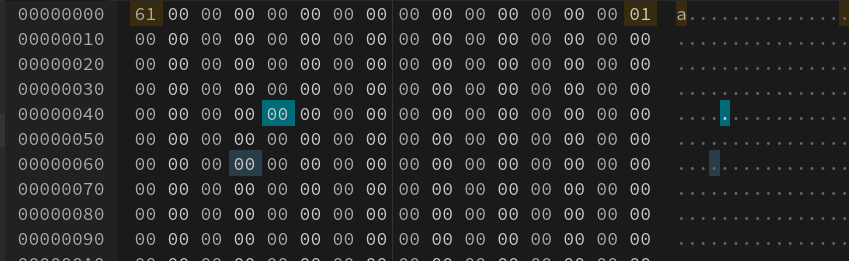
#include <cstdint>
#include <iostream>

int main() {
    uint8_t a = 0x61;
    std::cout << a << std::endl;
    return 0;
}
❯ make
a