(Lag) Link Aggregation
Technology in Network Switch to increase more throughput. The idea is to achieve better performance by sending several packets simultaneously down different links.
By default in a Network Switch, only single connection at a time can be active.
For example
The other ones will be blocked and acts as a fallover for the first one. This is to prevent Switching Loop this is the default behavior for STP (Spanning Tree Protocol)
(LAG) Link aggregation allows multiple switch to simultaneously active all interface at the same time.
- However, each connection from the portchannel is limited to its cable speed.
- The benefit only shows when we use multiple physical links in the same time
The way that it works is it creates logical interface associated with physical ports
A port failure will not trigger STP convergence process
[!important]
In a portchannel there is only a maximum of 8 physical links. This is because theHASHfunction will hash the value to the range of0-7.
Note
Since the way that PortChannel works is by default using the HASH value of the MAC Address to deliver packet (This is to ensure the MAC address to single port will never arrive out of order. We can also opt in other fields for hashing). If the traffic talk to the same destination address it will be limited to the same speed.
For example:
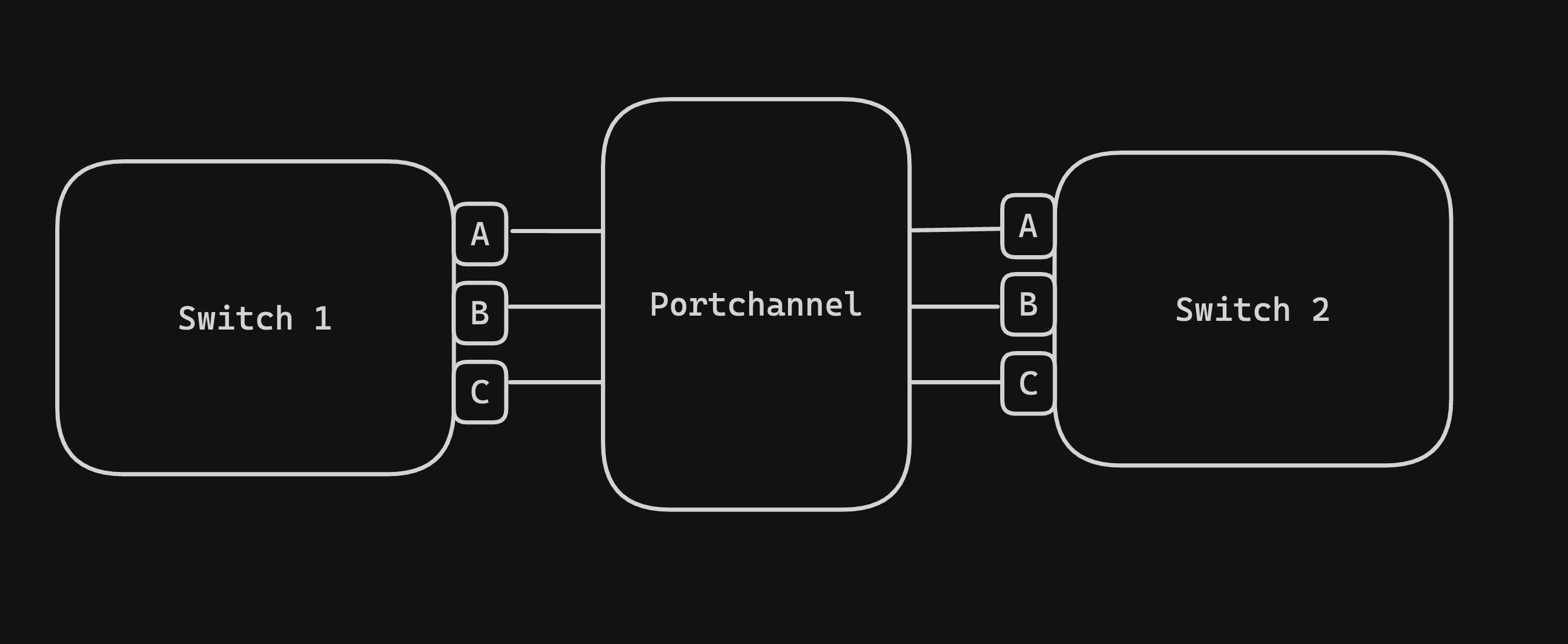
In this case, if Switch1-A and Swtich1-B Both talks to Switch2-A via the PortChannel. And the PortChannel is made of 3 1Gbps ethernet cable. We only have 1Gbps of speed in total.
The idea is we can support multiple connection to Switch2, just as long as we spread it out evenly to multiple ports
Balancing of PortChannel
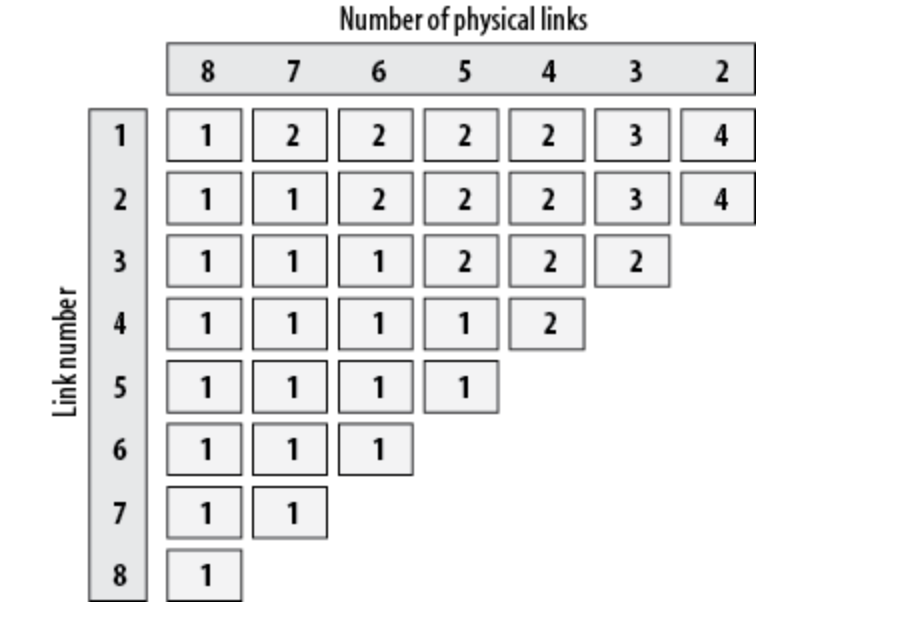
For example, if we have 2 physical links (ethernet cable). Cable 1 will need to handle 4 different traffic and Cable 2 will also have to handle 4 different traffic (to make up for 8 traffic)
If we have 6 physical links, then the first 2 cables will handle twice as much the traffic.
Options for hashing are
- Source MAC address
- Destination MAC address
- Source and Destination MAC address
- Source IP address
- Destination IP address
- Source and Destination IP address
- Source Port
- Destination Port
- Source and destination port
Example when to switch the Hash option
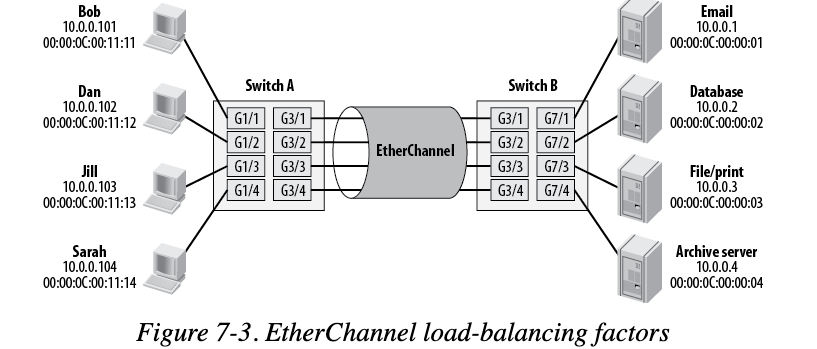
For example given this where email is used heavily. If we're using MAC address as the hash option it will be heavily on one channel.
As a result, the best situation for this is:
Switch A: hash using source MAC address (so it will use all the channels evenly)Switch B: hash using destination MAC address (since everyone is using Email, when replying email the source MAC address is email. In this case, we want to split out by choosing destination mac address).
Caviet problem
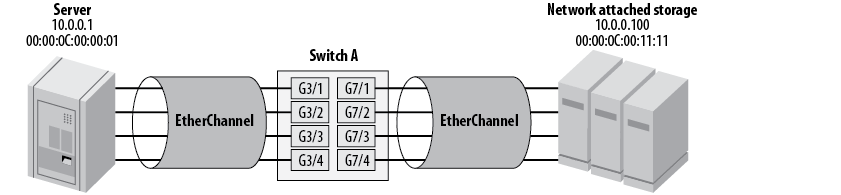
Given this situation where the server and the NAS is connected via the same switch.
We cannot use the Source and Destination mac address because they're all the same. The same for IP as well we can't use. We can't use Port either because once they're negotiated, they don't change
In this case, we have to make the NAS server to support multiple MAC address if allowed or use a 10 Gbps ethernet cable instead of PortChannel
Configuring and Managing PortChannel
One condition for all the links in the PortChannel is they must have the same type, the same speed and belong to the same VLAN.
If one of them is trunk, they must all be trunk, with the same trunk parameters
Dynamic LAG
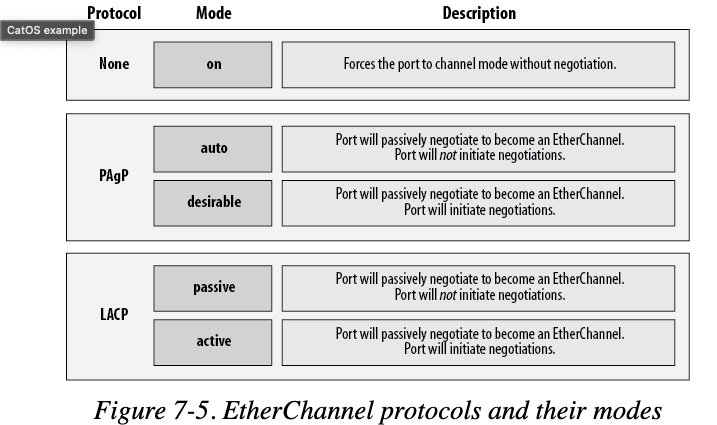
Rather than manually configure LAG, it's recommended to use dynamic configuration which use the negotiation over physical ports and disable the failure connection.
To configure dynamically, we can use
Multiple switch per Poprtchannel
We can merge multiple switches into 1 port channel, there are several technology for it:
Note
A few note with LAG:
- If the LAG is access mode (acting like a normal access port), it can only have 1 vlan
- If the LAG is trunk mode (vLAN Trunking), it can have multiple vlan but it's not for access mode. It's for vlans flow through only
- The peer port of a LAG port also have to be LAG as well. We can't have normal port connect to lag port since LACP (Link Aggregation Control Protocol) would not work.
- If the member in the lag suspended, the LAG will automatically fall back to other member for communication
- To config lag
enable: enter admin modeconfig t: enter config terminalint range gi0/0 - 1: select port gi0/0 and gi0/1switchport mode accessswitchport access vlan 10channel-group 1 mode active— assign to port-channel 1